Luma Dream Machine
- 3.3
- Rating
- 10.00K
- Installs
- Free
- Price
 Analysis by App-foxy
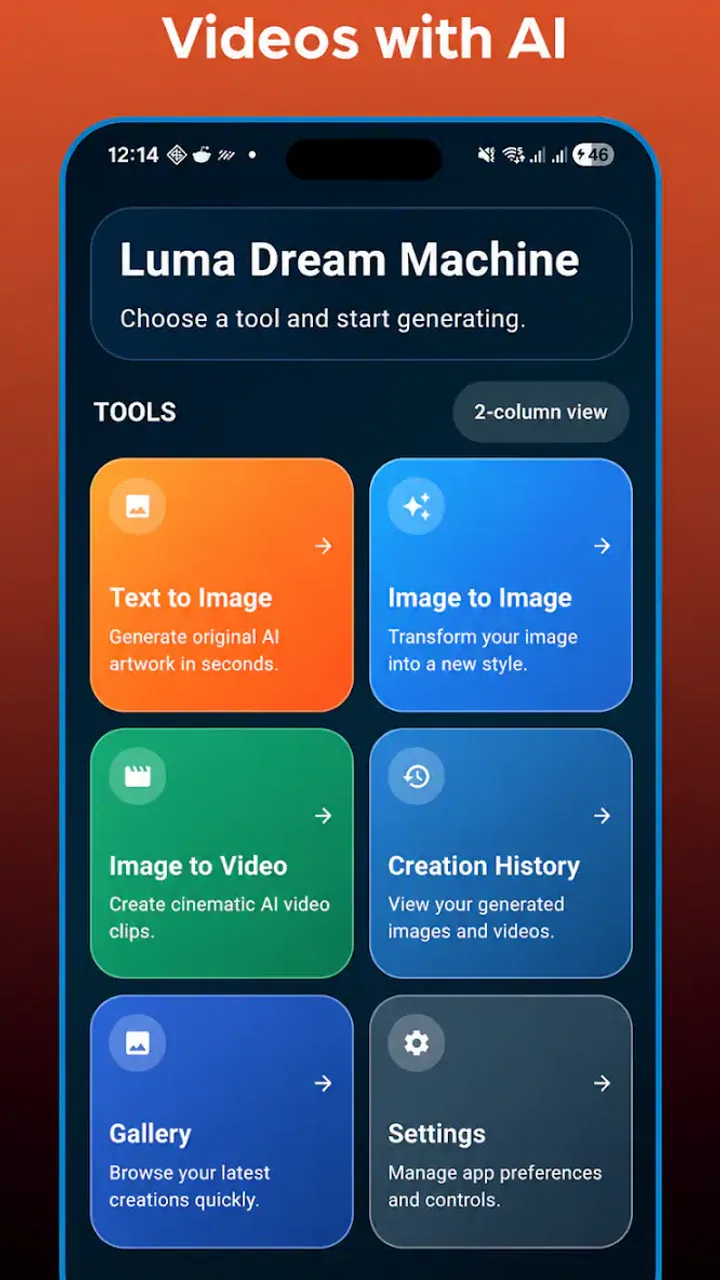
I approached Luma Dream Machine as a practical personalization app rather than as a simple novelty generator. Its focus is creating images and videos with AI, including text-to-image and image-to-image work, so it sits somewhere between a creative sketchbook and a quick visual production tool. I can see why someone would install it for social posts, mood boards, concept ideas, wallpapers, or short visual experiments, but the experience depends heavily on how clearly you describe what you want and how patiently you handle an imperfect result.
The app is developed by Infinity AI Solutions and is available free of charge, with optional in-app purchases ranging from $5.99 to $59.99 per item. That combination makes it easy to try without committing immediately, although frequent generation can make the paid options more relevant. It is rated for Everyone, runs on Android 7.0 and later, and its current version is 12. The app has passed 10K+ installs, with an average rating of 3.3 from around 89 ratings, so I would describe its reception as mixed rather than universally polished.
Where the first attempts usually get stuck
The biggest source of frustration is not necessarily the generator itself. It is the gap between what a person imagines and what an AI system can infer from a short sentence. “A beautiful city at sunset” leaves too many choices open: camera angle, architecture, weather, color balance, distance, mood, and whether the result should look photographic, illustrated, cinematic, or abstract. When the output feels wrong, many users immediately blame the app, even though the request was carrying very little usable direction.
You May Also Like

 Blood Strike: 2.5 Anniversary
Blood Strike’s Loadouts Turn Every Drop Into a Tactical Gamble
A close look at Blood Strike’s custom loadouts: how fast access to signature weapons reshapes its battle royale rhythm, rewards preparation, and narrows the gap between fights.

 Pandora - Music & Podcasts
Pandora’s Music Is Easy to Start, but Harder to Recover
Pandora’s strength is its low-effort path from a seed to a station. Its weak spot is how much confidence it asks you to place in connection, setup, and quiet recovery.

 8 Ball Pool
8 Ball Pool Is Built on Rivalries, Rematches, and Routine
A close look at the rivalries, rematches, shared routines, and unanswered safety questions that turn a quick pool match into a persistent mobile community.

 Samsung Music
Samsung Music’s Quiet Strength Is Playing What You Already Own
Its reach comes less from spectacle than from dependable access to a personal library. That simplicity is both the app’s strongest retention engine and its ceiling.

 AccuWeather: Weather Radar
AccuWeather Review: A Quick, Clear Forecast for Everyday Decisions
For everyday plans, the best forecast is the one you can understand quickly. AccuWeather makes rain timing, radar, and local conditions easy to act on, with a few trade-offs.

 Hill Climb Racing
Why Hill Climb Racing Still Turns Crashes Into One More Run
A tiny car, a bumpy hill and one more upgrade: Hill Climb Racing keeps resurfacing because its simple chaos makes every near-miss feel personal.
More From Our News Desk
View All News


I get more consistent results when I separate the request into subject, setting, visual style, lighting, composition, and exclusions. For example, instead of asking for a generic travel picture, I would describe a narrow street, warm evening light, eye-level view, realistic travel photography, muted colors, and no text or logos. This is not about writing a long paragraph for its own sake. It is about removing the decisions I do not want the generator to make.
Image-to-image work introduces a different kind of confusion. A source image gives the system a visual starting point, but it does not mean every detail will remain untouched. If I want a portrait to keep the same pose while changing the clothing, I need to state that relationship clearly. If I only describe the new clothing, the composition, face, or background may shift more than expected. That flexibility is useful for creative variations, but it is a poor fit for anyone expecting exact editing like a conventional photo editor.
Video generation can be even less predictable because motion adds another layer of interpretation. A still image may look convincing while the movement created from it feels unnatural or fails to emphasize the action I had in mind. I would treat the first video attempt as a draft, not a finished clip. A simple subject with one clear motion is a better starting point than a crowded scene containing several people, complicated camera movement, and multiple simultaneous actions.
Another place users can get stuck is assuming that a free installation means unlimited, frictionless use. The app itself costs nothing to download, but optional purchases are part of the experience. I recommend deciding in advance whether you are testing a few ideas or planning regular production. That small distinction matters because a person experimenting casually may be satisfied with occasional use, while someone creating many variations should think carefully about the cost of their workflow before relying on it.
What I check before blaming the prompt
My first check is whether the request has one obvious visual priority. If the important element is a person, I put that first. If the goal is a product concept, I describe the object, its position, the background, and the type of lighting. If the result is meant to work as a phone wallpaper, I mention the vertical composition and leave visual breathing room where icons will appear. These details are more useful than adding decorative adjectives.
I also avoid changing several variables at once. If an image-to-image result changes the subject, color palette, and composition simultaneously, I cannot tell which instruction caused the problem. A better approach is to keep the source and general framing stable, change one major element, and then make a second variation. This creates a simple comparison process and reduces the feeling that every attempt is random.
For video, I use verbs that describe visible movement rather than vague mood words. “The camera slowly moves closer while the leaves sway” gives a clearer direction than “make it dramatic.” I would also keep the scene uncluttered during early tests. Once the motion behaves reasonably, I can add atmosphere or more ambitious action without losing track of what went wrong.
Setup checks that save time before creating
Before using the app seriously, I would confirm that the device meets the minimum Android requirement of version 7.0. That is a basic compatibility check, but it is worth doing before troubleshooting generation behavior. If the app installs yet behaves poorly, I would also make sure the operating system and the app itself are not waiting for updates, then close other demanding applications and reopen the generator.
I would begin with a small, low-stakes test rather than a project that matters. A simple image prompt helps establish whether the app opens correctly, accepts the request, and returns a usable result. Only after that would I move to image-to-image or video. This order is practical because it separates an access problem from a workflow problem. If a basic request works, the issue is more likely related to the source image, prompt complexity, or the chosen type of generation.
Source preparation matters more than many people expect. For image-to-image, I prefer a clear image with the main subject easy to distinguish from its surroundings. Heavy clutter, tiny subjects, extreme darkness, or several competing focal points make it harder to communicate what should be preserved. I also keep an original copy outside the app, because experimentation is safer when I can return to the starting image instead of trying to reconstruct it.
For a phone wallpaper or profile image, I decide the intended use before generating. A visually attractive image can still be inconvenient if the main face or object sits exactly where interface icons, notification text, or cropping will cover it. I describe the composition with that final use in mind. Asking for open space on one side, for example, can be more useful than generating a detailed scene and trying to force it into a different layout afterward.
Prompt wording is another setup check. I avoid stacking contradictory instructions such as “minimal and extremely detailed” or “soft pastel colors with harsh neon lighting” unless the contrast is deliberate. I also keep text out of the scene unless I specifically want an experimental result. AI-generated lettering is often less dependable than the surrounding image, so I would create the visual first and add precise wording later in a dedicated design tool when accuracy matters.
Because the app is rated Everyone, it is positioned for a broad audience, but that should not be confused with professional control over every output. I would still review each generated image or clip before sharing it. A result can look fine at a glance while containing odd hands, distorted objects, inconsistent reflections, or motion that does not match the subject. The more important the final use, the less comfortable I would be publishing the first attempt without inspection.
A workflow that recovers instead of starting over
When a result misses the mark, I do not immediately throw away the entire idea. I first identify the single most visible failure. If the subject is correct but the style is wrong, I revise the style language. If the framing is wrong, I focus on camera position and composition. If the subject itself is misunderstood, I simplify the description before adding more detail. This turns an unsuccessful result into information about what the app interpreted.
I find it helpful to keep a short record of prompts that produce promising elements. I do not need a formal notebook; a plain text note with the successful subject description, style phrase, and composition instruction is enough. When I want a second version, I can preserve the useful structure and change only one part. That is especially valuable for a consistent set of social graphics or concept images where the visual identity should feel related.
For image-to-image variations, I use a gradual workflow. I start by asking for a modest change, such as a different environment or color treatment, while explicitly asking to preserve the subject and general pose. If that succeeds, I move to a bolder transformation. This is more reliable than requesting a complete reinvention immediately, because a total transformation gives the system too much freedom and makes it difficult to retain recognizable details.
For video, I would generate a short, simple concept before attempting a complicated sequence. A person turning toward the camera, clouds moving across a landscape, or a product rotating slowly has a clear beginning and direction. A crowded sports scene or a group conversation asks for many relationships to remain coherent at once. If the first type works better, that tells me the app is more suitable for controlled visual motion than for demanding narrative scenes.
When a generation appears frozen, incomplete, or fails to return, I use ordinary recovery steps: wait briefly, avoid tapping the same control repeatedly, check the connection, close and reopen the app, and retry with a simpler request. I would not repeatedly submit a complex prompt while uncertain whether the previous attempt is still processing. That can create confusion about which result belongs to which request and may make any purchase-related decision harder to track.
If the same basic request fails repeatedly, I would test a different source image or a shorter prompt. That comparison is useful because it distinguishes a problem tied to one input from a broader app issue. I would also keep the original prompt and note what happened before retrying. Even a simple record such as “basic text-to-image works, this source image does not” is more useful than changing every part of the process at once.
When the app is not the real cause
Some disappointing results come from choosing an AI generator for a job that needs exact control. If I need a logo with perfectly readable lettering, a product image with identical dimensions, or a portrait where facial details must remain unchanged, I would use a conventional editing or design application instead. Luma Dream Machine is better suited to exploration, transformation, and visual ideation than to pixel-level corrections.
The same distinction applies to video. If a project requires precise timing, dialogue synchronization, repeatable character continuity, or frame-by-frame editing, I would move the result into a dedicated video editor or choose a tool designed around those controls. The AI generator can still be useful for creating an opening visual, background idea, or mood reference, but I would not make it the only stage in a demanding production.
Network conditions can also look like an app failure. AI generation commonly involves sending a request and waiting for remote processing, so an unstable connection may interrupt the experience even when the prompt is perfectly written. If a simple request works on one connection but not another, I would investigate the connection before rewriting the prompt repeatedly. I would also avoid judging the entire app from one busy or interrupted session.
Device limitations are worth considering as well. A phone that is short on storage, running many background tasks, or under heavy thermal load may handle a creative app less comfortably than expected. I would free some space, close unused apps, and restart the device before drawing conclusions. These are unglamorous steps, but they often reveal whether the friction is coming from the phone rather than the generator.
There is also a human expectation problem. A prompt can describe an idea that sounds simple in words but is visually ambiguous. “A person holding a glass beside a window” leaves open which hand holds it, how the glass reflects light, where the window sits, and whether the person faces the viewer. If those details matter, I need to specify them. When they do not matter, I should accept variation as part of the creative process instead of treating every difference as an error.
Who will get the most from it
I think this app is a good match for people who want to turn rough ideas into visual starting points without learning a full design workflow. A student planning a presentation, a creator looking for a thumbnail concept, or someone building a personal mood board can benefit from quickly exploring several directions. It is also appealing for users who enjoy seeing how a familiar photograph changes under a new visual treatment.
A realistic everyday use case would be preparing a birthday invitation concept. I could generate a warm illustrated table scene with open space at the top, compare a few color moods, and then add the exact event wording in another tool. The app would handle the visual brainstorming, while a conventional editor would handle typography and final layout. That division of labor is more practical than expecting one AI result to be ready for printing.
It can also help with personal projects that begin before the user knows exactly what they want. I might start with a rough description of a fantasy room, generate a few compositions, then use the strongest one as a reference for furniture, lighting, and color choices. In that role, the app is not replacing a finished illustration; it is helping me make decisions that are difficult to make from a blank page.
I would be more cautious recommending it to someone who needs predictable output, strict privacy expectations, or a professional pipeline with repeatable settings. A person who dislikes trial and error may find the creative freedom tiring. Likewise, anyone who expects a normal photo editor, exact text rendering, or guaranteed continuity between generated video attempts should look at more specialized alternatives first.
How it compares with familiar alternatives
Compared with a standard wallpaper or theme app, this tool offers much more personal control over the starting idea, but it also requires more participation. A conventional wallpaper catalog is faster when I simply want a polished background immediately. Luma Dream Machine becomes more interesting when the available choices do not match my taste and I want to describe something specific.
Compared with a traditional photo editor, it is stronger at inventing or transforming visual content and weaker at exact corrections. A photo editor gives me dependable cropping, layers, color adjustments, masking, and text placement. This app gives me a more exploratory route from words or an existing image to a new concept. I would use both together rather than treating them as direct substitutes.
Compared with a dedicated video editor, its appeal is the speed of creating an idea from a prompt or image. The trade-off is control. An editor is better for timing, cuts, audio, captions, and precise revisions. I would use the AI output as raw material when the visual concept is the difficult part, then finish the communication in a tool built for assembly and polish.
The free entry point makes experimentation approachable, but the optional purchases change the calculation for heavy use. I would try the app with a small personal project, judge how often the results need reworking, and only then decide whether paid items make sense. That approach is safer than assuming every generated attempt will be useful or that a more expensive option automatically solves an unclear prompt.
After spending time with the app, my view is positive but measured. It is a flexible creative companion for visual exploration, especially when I want to move from a sentence or reference image to several possible directions. Its main strengths are immediacy and imagination; its main weaknesses are inconsistency, the need for careful prompting, and the lack of the exact controls I expect from conventional editing software.
My practical recommendation is to start with a simple text-to-image request, establish a clear subject and composition, and treat the first result as a draft. Then use image-to-image for controlled variations and reserve video experiments for scenes with one obvious motion. Keep original files, change one major variable at a time, and inspect every result before sharing it.
The best reason to try it is not that it eliminates creative work, but that it gives me a fast way to explore more ideas. If that sounds useful, the free installation is an easy starting point. If your priority is exact lettering, fixed layouts, dependable character continuity, or professional finishing control, I would combine it with a conventional editor or choose a more specialized alternative instead.
FAQs for Luma Dream Machine
01What is Luma Dream Machine?
Luma Dream Machine is an AI-powered video generation tool that creates short video clips from text prompts and, in some cases, reference images. You describe a scene, movement, style, or camera direction, and the service produces a cinematic-looking result. It is designed for concept development, social media content, visual experiments, storyboarding, and creative projects rather than guaranteed frame-perfect production work.
02Is Luma Dream Machine available as a mobile app for Android and iOS?
Availability can differ depending on the current release and region. Luma’s video-generation experience has commonly been accessed through its official website, while mobile applications or companion experiences may be offered separately. Before downloading anything, check the developer name, official store listing, supported operating system, and recent reviews. Avoid unofficial apps claiming to provide the service, since they may not be connected to Luma.
03Does Luma Dream Machine cost money, and is there a free plan?
Luma Dream Machine may provide limited free access, but free generations can be restricted by credits, queues, resolution, watermarking, usage limits, or commercial-use conditions. Paid subscriptions generally offer more credits, faster generation, higher limits, and additional features. Pricing and plan rules can change, so review the current in-app or official website billing details before creating content or subscribing.
04What kind of videos can Luma Dream Machine create?
The tool is best suited to short, visually focused clips such as cinematic landscapes, product concepts, fantasy scenes, animated ideas, camera movements, and stylized social media visuals. Results depend heavily on the prompt and may include inconsistent faces, hands, text, object details, or motion. It is useful for ideation and experimentation, but users should expect to regenerate and edit clips rather than receive a perfect final video immediately.
05Are videos made with Luma Dream Machine safe to use commercially?
Commercial use depends on the subscription tier, current terms of service, the source material used, and any restrictions attached to generated content. You should read Luma’s latest licensing and usage policies before using a clip in advertising, client work, monetized videos, or branded campaigns. Do not upload copyrighted images, private personal material, or recognizable people without appropriate permission, and remember that AI output may require additional legal review.
Pros
- Creates impressive cinematic videos from simple text prompts.
- Supports image-to-video generation for more creative control.
- Produces varied visual styles
- from realistic to artistic.
- Cloud-based processing works without powerful phone hardware.
- Regular updates bring new generation features and improvements.
Cons
- Free generations can run out quickly during frequent experimentation.
- Results may include distorted faces
- hands
- or moving objects.
- Complex prompts do not always produce consistent scene details.
- Generation times can increase during periods of high demand.
- Some advanced tools and higher limits require a paid plan.

Luma Dream Machine
Gallery